Here's an e-mail that I received this morning. Its tempting to engage in a bit of fun. But I just don't have the time right now. I guess that not everyone in the world knows about the scams as they're still trying it on.
If anyone is wondering what a scam email looks like, here is one.
From Mr Benson Karim
Auditing Manager,
Bank of Africa(B.O.A)
Ouagadougou Burkina Faso.
West Africa.
ATTN,
Sorry to distract your attention, I am Mr Benson Karim the Auditing manager
in the bank of Africa Ouagadougou Burkina Faso West Africa.
In my department, I found the deposited fund amounted ($12.5 MILLION US
DOLLARS) belonging to a customer who died in the air crash with his entire
family.
However, I shall detail you with the full information as soon as I hear from
you.
Can you be able and capable to assist me provide your receiving bank account
where this fund will lodge in your favour?
I shall give you 35% of the total sum as soon as this fund hits your account
and I shall visit you in your country for the shearing of the fund.
Please this is very confidential. If you are interested, please forward to me
the bellow information's;
Your name:............................
Your country:.........................
Your phone Number:......................
Your tel/fax:...........................
Your age:...............................
Your occupation:.......................
Thank for your anticipated co-peration.
Your's Faithfully.
Mr Benson Karim
Tuesday, February 24, 2009
Friday, February 13, 2009
Web UI Patterns
From the authors of Designing Web Interfaces via Ajaxian, via their blog. 390 screens have been added to the Designing Web Interfaces Photostream.
You should also checkout the 15 Common Component Patterns.
Lots of inspiration, eye candy and general UI tips for the Domino developers out there.
You should also checkout the 15 Common Component Patterns.
Lots of inspiration, eye candy and general UI tips for the Domino developers out there.
Thursday, January 15, 2009
2008 retrospective
2008 was an interesting year, there have been many highlights. However, one of the most rewarding aspect has been writing this blog and giving back to the community. Even though I've been around Notes and Domino a long time I've never really been in a position to regularly contribute. It's been great to change that and something that I've really enjoyed. I would like to thank all those who have commented on my blog. It's great to get feedback that the posts and downloads have been useful and you've gained something out of them.
However, next week I'll be mostly reading. I hope that all the LS09 attendees enjoy next week and I'm looking forward to keeping up with all the latest news.
However, next week I'll be mostly reading. I hope that all the LS09 attendees enjoy next week and I'm looking forward to keeping up with all the latest news.
Thursday, December 18, 2008
Vista UI gaffe : Why users delete the recycle bin
I'm not running Vista, but happened upon this particular gaffe and thought it was worth sharing for those of you that use Vista or have users that do. The link also has instructions on restoring and stopping users from this particular problem.
why people delete the recycle bin

I would have thought that using "Remove Recycle Bin" or even "Delete Recycle Bin" rather than "Delete" would have been a better option.
I guess that MS didn't pass round the "Don't make me think" book.
why people delete the recycle bin
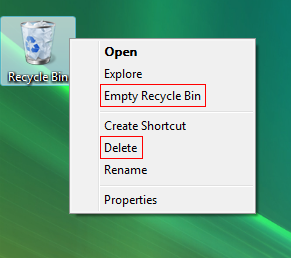
I would have thought that using "Remove Recycle Bin" or even "Delete Recycle Bin" rather than "Delete" would have been a better option.
I guess that MS didn't pass round the "Don't make me think" book.
Friday, November 28, 2008
Dojo Domino Applications : Performance Tips
Are you curious about how to get better performance from your dojo domino apps, here are the results of me taking a little peek.
In my last dojo app, I only used a few controls and as such performance was 'good enough'. However, it was niggling me that I should look into the dojo custom build system. I'm currently building a new audit and I need to use additional controls. It was enough of a reason for me to take a peek.
The two things that I wanted to find out were;
The Dojo Build System - Creating your own custom build.
As Tim has already blogged about, using Dojo in its vanilla state means that you will have a whole bunch of seperate HTTP requests - which affects performance. In addition, the files haven't been optimized for downloading quickly. The dojo build system optimise the files by interning, removing whitespace, removing some comments, shortens variable names and rationalising the dojo layers.
I was quite surprised just how easy the build system was to set up and use. Here is what to do.
1. Download the source code files - I used the dojo-release-1.2.2-src.zip
2. You then need to create a profile. This tells the build system what bits of dojo you use. Its pretty much the dojo.requires entries. This is what my scius-profile.js looks like and you need to put this in the util\buildscripts directory.
dependencies = {
layers: [ {
name: "scius-dojo.js",
dependencies: [
"dojo.parser",
"dijit.Dialog",
"dijit.form.Button",
"dijit.form.DateTextBox",
"dijit.form.NumberTextBox",
"dijit.form.CheckBox",
"dijit.ProgressBar",
"dijit.layout.ContentPane",
"dijit.layout.StackContainer"
] },
],
prefixes: [ [ "dijit", "../dijit" ], [ "dojox", "../dojox" ] ] }
3. You then need to run the build script, you can do this from the command line - or from a batch file in the buildscript directory. My scius-build.bat looks like this
build.bat
profile=scius
action=release
profileFile=scius-profile.js
releaseName=scius-dojo-122
optimize=shrinksafe
layerOptimize=shrinksafe
copyTests=false
localeList=en,en-us,en-au
I've chosen to use the dojo version in my release, so that I can keep track of which dojo version it contains (you can also include your own version attributes). I've also decided to use a custom list of locales rather than the default, the audit is only available to Australians, so I wanted to cover most language settings that might be used.
After about 85 seconds, the build system is finished and you then have your own custom build waiting for you in the release directory.
How to use the custom build in your page ?
Now that you have your own compacted build you'll need to use it in your web app. In your pages that use dojo, you will need to update the dojo references to the new build and also include a reference to your custom build js.
I update the head tags to include /dojo/scius-dojo.js as well as the reference to the /dojo/dojo.js. My new script links look like this;
<script type="text/javascript" src="https://website/scius-dojo-122/dojo/dojo.js" djconfig="isDebug: false, parseOnLoad: true"></script>
<script type="text/javascript" src="https://website/scius-dojo-122/dojo/scius-dojo.js"></script>
When the pages loaded, the number of http requests is reduced from 80 to 59 requests and even though the number of Kb increased, this changed the initial load time from 12.98 seconds to 4.21 seconds and the cached time from 6.98 to 2.185.
 Where should I store the dojo files ?
You may have noticed that the path to the dojo files did not include a database. That's right, I've placed the files directly under the servers data directory. On my linux server that is /local/notesdata/domino/html/scius-dojo-122. Putting commonly used web files under the html directory is a well known performance technique. However, sometimes it's not always possible or desirable. For example, I'm quite happy to put my compacted versions of the standard dojo implementation there as I don't have a lot of applications or dojo variations to manage. I also have easy access. If you want out-and-out performance, that's the way to go.
Can you reduce the number of requests further ?
Maybe not for the original request but for further requests, yes you can. You need to set the expires header. If you follow the teachings of Yahoo, YSlow will give you a report on the files that don't have the expires headers set. Chris Linfoot and Chris Brandlehner have both blogged about setting the expires header for domino applications in more detail.
So exactly how do you do that ? It's a server config thing. You can specify rules for a website where domino will set the expires date. I set mine to cache any of my database theme files, all the scius dojo files and one rogue js file in the design. Just remember, don't set this as a global setting - it's a bad idea.

So now, subsequent page loads are very snappy. Down from 2.1 to under 1 second. You can see for the subsequent load only the html is needed. Everything else has been cached. 515kb to 39k and 59 requests down to 1 request.
 Of course, YSlow is still give me rating of F. I still need to move CSS at the top, GZip my files, use a CDN and reduce the initial number of HTTP requests. However, now that the page loads have been reduced, I'm not going to sweat it.
;-)
Of course, the last bit is reducing the time taken to download the HTML. If your application generates this dynamically through agents, views or forms, and it's this part that takes a long time, then you might need to consider performance improvements in the Notes application too.
Summary.
Was the custom build system easy to use ?
Yes. It didn't take too long to figure out my profile. Running a batch file and copying a directory doesn't take much effort either. Heck, you could probably automate that whole thing with ANT, including copying the custom build to your server by FTP - if you really wanted to.
How much difference did this make to performance ?
Using a custom build reduced both the initial and cached load time by half, setting the expires date reduced the cached loaded page by half again.
It terms of effort versus gain, it's well worth using the dojo custom build, maybe not for development. Maybe as a last step before promoting your application into your test and production environments.
Additional Notes about the Set up:
The environment I used was my development 8.0 server, running in a bridged VM with 512mb ram. The browser is on the host machine. I've noted in the past that this is slower than the response time I get on my production servers. However, it's a good control environment.
In my last dojo app, I only used a few controls and as such performance was 'good enough'. However, it was niggling me that I should look into the dojo custom build system. I'm currently building a new audit and I need to use additional controls. It was enough of a reason for me to take a peek.
The two things that I wanted to find out were;
- How easy is the dojo custom build system ?
- How much difference will this make to the performance ?
The Dojo Build System - Creating your own custom build.
As Tim has already blogged about, using Dojo in its vanilla state means that you will have a whole bunch of seperate HTTP requests - which affects performance. In addition, the files haven't been optimized for downloading quickly. The dojo build system optimise the files by interning, removing whitespace, removing some comments, shortens variable names and rationalising the dojo layers.
I was quite surprised just how easy the build system was to set up and use. Here is what to do.
1. Download the source code files - I used the dojo-release-1.2.2-src.zip
2. You then need to create a profile. This tells the build system what bits of dojo you use. Its pretty much the dojo.requires entries. This is what my scius-profile.js looks like and you need to put this in the util\buildscripts directory.
dependencies = {
layers: [ {
name: "scius-dojo.js",
dependencies: [
"dojo.parser",
"dijit.Dialog",
"dijit.form.Button",
"dijit.form.DateTextBox",
"dijit.form.NumberTextBox",
"dijit.form.CheckBox",
"dijit.ProgressBar",
"dijit.layout.ContentPane",
"dijit.layout.StackContainer"
] },
],
prefixes: [ [ "dijit", "../dijit" ], [ "dojox", "../dojox" ] ] }
3. You then need to run the build script, you can do this from the command line - or from a batch file in the buildscript directory. My scius-build.bat looks like this
build.bat
profile=scius
action=release
profileFile=scius-profile.js
releaseName=scius-dojo-122
optimize=shrinksafe
layerOptimize=shrinksafe
copyTests=false
localeList=en,en-us,en-au
I've chosen to use the dojo version in my release, so that I can keep track of which dojo version it contains (you can also include your own version attributes). I've also decided to use a custom list of locales rather than the default, the audit is only available to Australians, so I wanted to cover most language settings that might be used.
After about 85 seconds, the build system is finished and you then have your own custom build waiting for you in the release directory.
How to use the custom build in your page ?
Now that you have your own compacted build you'll need to use it in your web app. In your pages that use dojo, you will need to update the dojo references to the new build and also include a reference to your custom build js.
I update the head tags to include /dojo/scius-dojo.js as well as the reference to the /dojo/dojo.js. My new script links look like this;
<script type="text/javascript" src="https://website/scius-dojo-122/dojo/dojo.js" djconfig="isDebug: false, parseOnLoad: true"></script>
<script type="text/javascript" src="https://website/scius-dojo-122/dojo/scius-dojo.js"></script>
When the pages loaded, the number of http requests is reduced from 80 to 59 requests and even though the number of Kb increased, this changed the initial load time from 12.98 seconds to 4.21 seconds and the cached time from 6.98 to 2.185.
 Where should I store the dojo files ?
You may have noticed that the path to the dojo files did not include a database. That's right, I've placed the files directly under the servers data directory. On my linux server that is /local/notesdata/domino/html/scius-dojo-122. Putting commonly used web files under the html directory is a well known performance technique. However, sometimes it's not always possible or desirable. For example, I'm quite happy to put my compacted versions of the standard dojo implementation there as I don't have a lot of applications or dojo variations to manage. I also have easy access. If you want out-and-out performance, that's the way to go.
Can you reduce the number of requests further ?
Maybe not for the original request but for further requests, yes you can. You need to set the expires header. If you follow the teachings of Yahoo, YSlow will give you a report on the files that don't have the expires headers set. Chris Linfoot and Chris Brandlehner have both blogged about setting the expires header for domino applications in more detail.
So exactly how do you do that ? It's a server config thing. You can specify rules for a website where domino will set the expires date. I set mine to cache any of my database theme files, all the scius dojo files and one rogue js file in the design. Just remember, don't set this as a global setting - it's a bad idea.

So now, subsequent page loads are very snappy. Down from 2.1 to under 1 second. You can see for the subsequent load only the html is needed. Everything else has been cached. 515kb to 39k and 59 requests down to 1 request.
 Of course, YSlow is still give me rating of F. I still need to move CSS at the top, GZip my files, use a CDN and reduce the initial number of HTTP requests. However, now that the page loads have been reduced, I'm not going to sweat it.
;-)
Of course, the last bit is reducing the time taken to download the HTML. If your application generates this dynamically through agents, views or forms, and it's this part that takes a long time, then you might need to consider performance improvements in the Notes application too.
Summary.
Was the custom build system easy to use ?
Yes. It didn't take too long to figure out my profile. Running a batch file and copying a directory doesn't take much effort either. Heck, you could probably automate that whole thing with ANT, including copying the custom build to your server by FTP - if you really wanted to.
How much difference did this make to performance ?
Using a custom build reduced both the initial and cached load time by half, setting the expires date reduced the cached loaded page by half again.
It terms of effort versus gain, it's well worth using the dojo custom build, maybe not for development. Maybe as a last step before promoting your application into your test and production environments.
Additional Notes about the Set up:
The environment I used was my development 8.0 server, running in a bridged VM with 512mb ram. The browser is on the host machine. I've noted in the past that this is slower than the response time I get on my production servers. However, it's a good control environment.
Tuesday, October 21, 2008
Taking the View to PDF example to the next step.
As promised, here are some enhancements to make the PDF of a view a little nicer on the eyes.
The example agent enclosed improves on the previous version by;
Remember, if you have complicated reports or want fine grained control then write directly to iText. I also wanted to demonstrate that the PDF generation side is the easy bit. This means that you can spend more time writing the domino parts and tweeking for your formats than writing the PDF stuff.
The code is attached here and extracts below.
You should be able to take the agent code and just change the view name and you'll have a nicer looking PDF of your views - providing you like the colours and images. In the course of building this examples I made a few assumptions about the number of categories, and location of hidden columns. You might need to tweek the agent code if your views have more than one category or have totals and hidden columns in different locations. Its not just a drop in and works for every scenario.
What's next ?
I guess a notes document to PDF would be a nice example, so that's what will be in the pipeline. However, impending work commitments mean that it's highly likely that it won't be in the near future.
The example agent enclosed improves on the previous version by;
- handling a view with one category or a flat view
- handling a view that has hidden, icon and total detail columns
- adding a header image (from SuperNTF)
- adding a footer with page numbers
Remember, if you have complicated reports or want fine grained control then write directly to iText. I also wanted to demonstrate that the PDF generation side is the easy bit. This means that you can spend more time writing the domino parts and tweeking for your formats than writing the PDF stuff.
The code is attached here and extracts below.
// get the date time for the report
DateTime dt = session.createDateTime("Today");
dt.setNow();
// the generic data object
PdfData data = new PdfData();
// where to put the file
PdfDocumentConfig config = new PdfDocumentConfig("Text",
"ViewByTitle.pdf", "c:\\pdfs");
/*
* Set up some of the styles that
* we will use in the pdf document.
*/
// the style for the database and view title
Style styleViewTitle = new Style("viewTitle", Style.TYPEFACE_HELVETICA,
18);
styleViewTitle.setDecoration(Style.DECORATION_BOLD);
styleViewTitle.setAlign(Style.ALIGN_CENTER);
styleViewTitle.setBackgroundColour(232, 232, 232);
styleViewTitle.setColor(0, 94, 187);
// the style for the date stamp
Style styleDate = new Style("date", Style.TYPEFACE_HELVETICA, 10);
styleDate.setAlign(Style.ALIGN_RIGHT);
styleDate.setBackgroundColour(Color.RED);
// the style for the view column titles
Style styleColumnTitle = new Style("columnsTitle",
Style.TYPEFACE_HELVETICA, 12);
styleColumnTitle.setDecoration(Style.DECORATION_BOLD);
styleColumnTitle.setBackgroundColour(232, 232, 232);
styleColumnTitle.setColor(0, 94, 187);
// the style for the column categories
Style styleColumnCat = new Style("columnsCat", Style.TYPEFACE_HELVETICA,
12);
styleColumnCat.setDecoration(Style.DECORATION_BOLD);
styleColumnCat.setBackgroundColour(247, 247, 247);
styleColumnCat.setColor(255, 153, 0);
// the default style for the view data
Style styleViewDefault = new Style("default", Style.TYPEFACE_HELVETICA,
10);
/*
* set header image - used the image from the superNTF nsf
*/
HeaderImage headerImage = new HeaderImage();
headerImage.addImage("c:\\pdfs\\BrandBanner.gif");
headerImage.setImageScale(HeaderImage.IMAGE_NO_SCALE, false);
// create a header to write the date into
HeaderTwoColumns header = new HeaderTwoColumns(50, 50);
header.setLeftColumn(new CellElement("", styleDate));
header.setRightColumn(new CellElement(dt.getDateOnly(), styleDate));
header.setStyle(styleDate);
header.setHeight(100);
// create a footer
FooterTwoColumns footer = new FooterTwoColumns(50, 50);
footer.setLeftColumn(new CellElement(
"http://palmerweb.blogspot.com - http://www.scius.com.au"));
footer.setRightColumn(new CellElement("", styleDate));
footer.setStyle(styleViewDefault);
footer.setPageNum(new PageNumbersElement(styleDate));
footer.includePageNumbers(true,
FooterTwoColumns.PAGE_NUMBERS_RIGHT);
// getting the notes handles
AgentContext ctx = session.getAgentContext();
Database db = ctx.getCurrentDatabase();
// this is the view
View viewMembers = db.getView("vw-docsbytitle");
// read the columns to get the report headings
Vector cols = viewMembers.getColumns();
// filter out the columns that we are not interested in
// such as icons, hidden, total details and categories
Vector colsToRead = new Vector();
for (int x = 0; x < cols.size(); x++) {
ViewColumn col = (ViewColumn) cols.get(x);
if (col.isIcon() == false && col.isCategory() == false
&& col.isHidden() == false
&& col.isHideDetail() == false) {
colsToRead.add(col);
}
}
// create a table based on the number of columns
TableElement tb = new TableElement(colsToRead.size());
/*
* create the heading (repeating) rows for the table.
*/
// database and view title
RowElement rw = new RowElement();
CellElement title = new CellElement(db.getTitle() + " - "
+ viewMembers.getName() + "\n\n", styleViewTitle);
title.setCellspan((colsToRead.size()));
rw.addCell(title);
rw.setTableHeading(true);
tb.AddRow(rw);
// column headings
rw = new RowElement();
for (int x = 0; x < colsToRead.size(); x++) {
ViewColumn col = (ViewColumn) colsToRead.get(x);
rw
.addCell(new CellElement(col.getTitle() + "\n\n",
styleColumnTitle));
}
rw.setTableHeading(true);
tb.AddRow(rw);
/*
* populate the table with the view data
*/
ViewNavigator viewNav = viewMembers.createViewNav();
ViewEntry rowData = viewNav.getFirst();
while (!(rowData == null)) {
rw = new RowElement();
Vector viewCol = rowData.getColumnValues();
// check to see if this is a category
if (rowData.isCategory()) {
CellElement catCell = new CellElement("\n"
+ viewCol.get(1).toString() + "\n\n", styleColumnCat);
catCell.setCellspan(colsToRead.size());
rw.addCell(catCell);
} else if (rowData.isDocument()) {
for (int x = 0; x < colsToRead.size(); x++) {
ViewColumn col = (ViewColumn) colsToRead.get(x);
int pos = col.getPosition() - 1;
rw.addCell(new CellElement(viewCol.get(pos).toString(),
styleViewDefault));
}
}
tb.AddRow(rw);
rowData = viewNav.getNext(rowData);
}
// add the table to the data object
data.add(tb);
// overide the default layout
LayoutElement layout = new LayoutElement(LayoutElement.PAGESIZE_A4,
LayoutElement.ORIENTATION_LANDSCAPE, 10, 10, 10, 10, 40, 50);
// add the image to the layout
layout.setHeaderImage(headerImage);
layout.setFooter(footer);
layout.setHeader(header);
// configure with the config, data and layout
PdfDocument pdf = new PdfDocument(config, data, layout);
// go
pdf.createDocument();
You should be able to take the agent code and just change the view name and you'll have a nicer looking PDF of your views - providing you like the colours and images. In the course of building this examples I made a few assumptions about the number of categories, and location of hidden columns. You might need to tweek the agent code if your views have more than one category or have totals and hidden columns in different locations. Its not just a drop in and works for every scenario.
What's next ?
I guess a notes document to PDF would be a nice example, so that's what will be in the pipeline. However, impending work commitments mean that it's highly likely that it won't be in the near future.
Monday, October 20, 2008
Notes View to PDF in 60 seconds
Watch the movie to see how to create a pdf of a view in 60 seconds.
I've produced a movie to demonstrate how easy it is to write an agent that creates a pdf of a view using my new library. I chose SuperNTF as it was the first database that had a flat view and a selection of documents. I copied and pasted enough entries to give me two pages so that you can see repeating headers. It's not quite as entertaining as 'Gone in 60 seconds' but does show you how quickly you can implement this in your own databases.
Below is the example code from the movie that simply dumps the content of a designated flat view to a table in a pdf. I've updated the library to Beta 7 to contain a minor enhancement to allow you to specify rows that are designated as headers. These header rows (yes you can specify more than one) are repeated on each page as the content forces a page break. Again, most of the heavy lifting is done by iText.
The Code
// the generic data object
PdfData data = new PdfData();
// where to put the file
PdfDocumentConfig config = new PdfDocumentConfig("Text",
"agent-test.pdf", "c:\\temp");
// getting the notes handles
AgentContext ctx = session.getAgentContext();
Database db = ctx.getCurrentDatabase();
// this is the view
View viewMembers = db.getView(" - insert your view alias here - ");
// get the column names for a header
Vector cols = viewMembers.getColumnNames();
// create a table based on the number of columns
TableElement tb = new TableElement(cols.size());
// start populating with the column names
RowElement rw = new RowElement();
for (int x = 0; x < cols.size(); x++) {
rw.addCell(new CellElement(cols.get(x).toString()));
}
// mark this as a table header to be repeated
rw.setTableHeading(true);
tb.AddRow(rw);
// start populating the table with the view data
ViewNavigator viewNav = viewMembers.createViewNav();
ViewEntry rowData = viewNav.getFirst();
while (!(rowData == null)) {
rw = new RowElement();
Vector viewCol = rowData.getColumnValues();
for (int y = 0; y < viewCol.size(); y++) {
rw.addCell(new CellElement(viewCol.get(y).toString()));
}
tb.AddRow(rw);
rowData = viewNav.getNext(rowData);
}
// add the table to the data object
data.add(tb);
// overide the default layout
LayoutElement layout =
new LayoutElement(LayoutElement.PAGESIZE_A4,
LayoutElement.ORIENTATION_LANDSCAPE,
10, 10, 10, 10, 10, 10);
// configure with the config, data and layout
PdfDocument pdf = new PdfDocument(config, data, layout);
// go
pdf.createDocument();
} catch (Exception e) {
e.printStackTrace();
} finally {
}
I've seen the move so how can I use this ?
1. Download Beta 7, and extract the updated jar file to a directory c:\lib
2. Download The JavaAgentPdf code
3. Create a new Java agent in your database, add the iText-2.0.8 jar and the new scius-pdfdoc.beta7.jar
3. Replace the JavaAgent code with the downloaded version and update the view name, pdf filename and pdf directory.
Enhancing the example further.
To keep this example short and under 30 lines, I have skipped of some of the things that you should add in for a production implementation, such as dealing with exceptions and checking that the domino objects are not null. However, for a proof-of-concept - it might be adequate. You would also need to write a few more lines to account for a categorised views, hidden columns and possibly the final enhancement would be to make the report look nice with some styles.
Stay tuned because the next post might have an example that produces a pdf that is a bit nicer on the eyes.
Update : The link to the zip file has changed. I found a bug with Beta7 and ParagraphElements.
Subscribe to:
Posts (Atom)